I often struggle coming up with ideas for blog posts. Thank you Datazen again for another idea! After encountering the issue I posted earlier (link to post) when working with maps, I was very anxious to try to create a custom map. I started working on one with my brewery data. I ran into several bumps in the process so wanted to share with everyone.
***
I had collected several shapefiles through the years playing with spatial data. I began trying a few of them in Datazen but had a hard time finding any that worked. When I would select them, they would just hang and sit there. Some were very large so I suspected there was a size limit though there wasn’t anything in the documentation. In my testing I couldn’t get anything over 1MB to work. Later Chris Finlan said that the actual limit is 512 KB! Rather limiting but there is a potential workaround by using mapshaper.org to minimize the size. Depending on what type of shapefile you are using it can distort your polygons potentially too much so that workaround only goes so far.

Tweet from Chris Finlan on shapefile size.
After getting the size issue nailed down, I continued on with my mission of getting my custom map working. Normally when you use shapefiles they contain a few files. Datazen uses the shp file and dbf file. The shp file contains the polygon information and details to draw the map. The dbf file contains the attributes about those shapes or the data you’ll need to tie to your own data. Below is a screenshot of my dbf file using DBF Viewer 2000 software (free trial then about $50 to purchase after 30 days at http://www.dbf2002.com/).

The original dbf file
You can see it has a key field (ogr_fid) then zcta5ce10 which is actually field that contains zip code. The zcta5ce10 field is the key I needed to use to tie with my own data containing zip codes. When you use Datazen you can’t select the proper key, and as it turns out it must have the key as the first column in the dbf file! Crazy right?! Using the DBF Viewer 2000 software, I had move the column to be the first in the dbf file.

Updated dbf file to move key column to be first.
After a bit of head shaking I move on and at this point I was excited to see my custom map working! But wait, why is my data point not where I expect it to be? I was mapping zip codes of breweries in Indiana that have been rated on BeerAdvocate. There is unfortunately only one (though I’d argue that should be more) and it’s Three Floyds which is up near Chicago but the Datazen map wasn’t accurately showing it (see below).
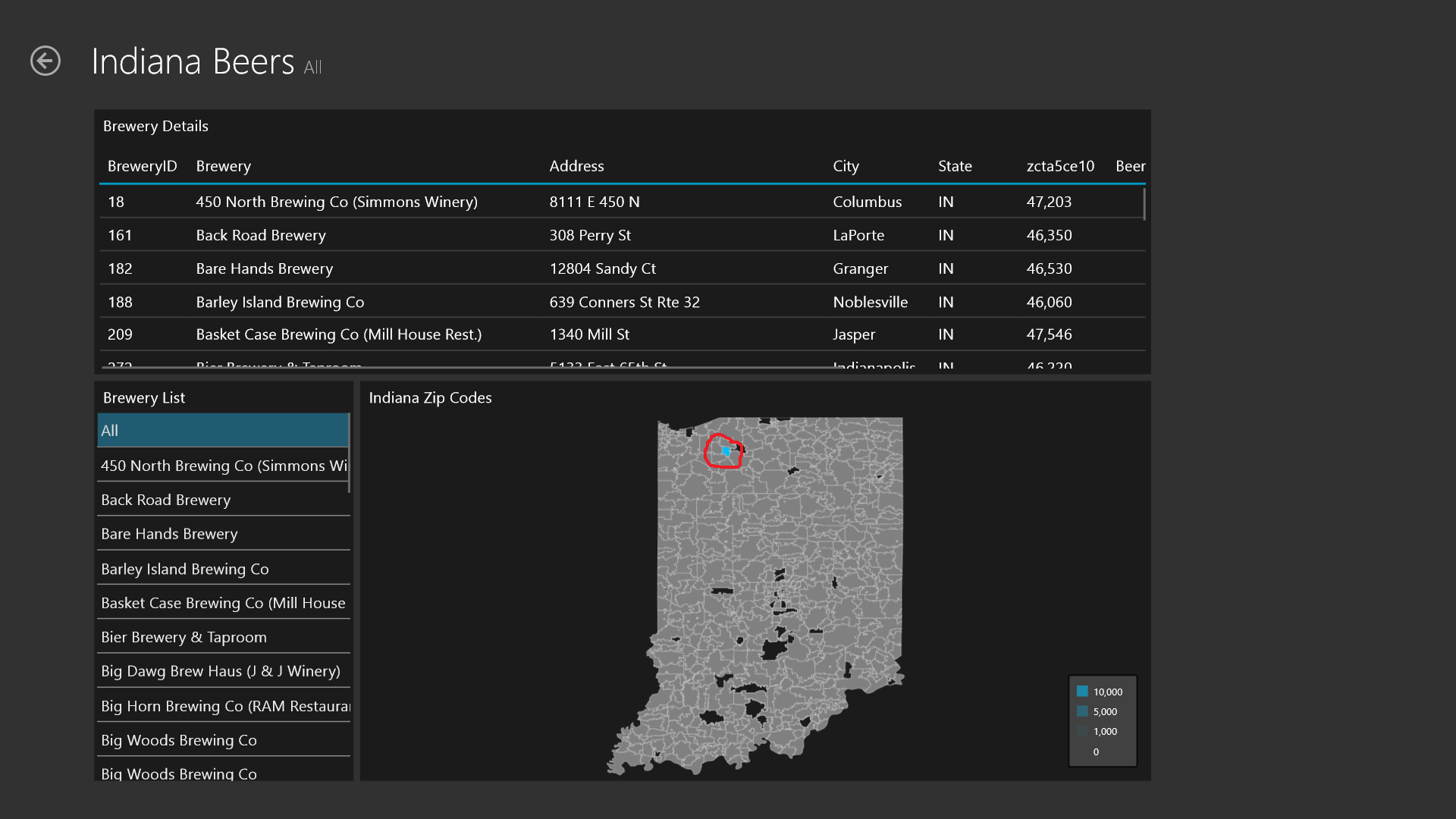
The report displaying the location incorrectly.
I opened up the shapefiles in other programs (QGIS/Google Earth) and it was showing correctly both before and after minimization process. After talking with Datazen support it, they sent this info:
***
“While I can’t say for certain where things went wrong, I suspect it was due to improper minifying – something got misaligned between the SHP and the DBF and QGIS and Google Earth all read the SHX file to properly map the shapes to the database. Datazen does not do that. We assume a 1-to-1 relation between shape and data: the Nth shape corresponds to the Nth entry in the DBF.”
***
I had inadvertently changed the order of the data in the dbf file when I had to edit the order of the columns. Since other programs I use to view shapefiles also use the shx file, there wasn’t an issue with them correctly mapping the shape to the attribute even after accidentally changing the order. A shx file is basically a linking/index file between the shp and dbf files. Be very careful when editing the order of your columns in the dbf file. One accidental click on a column and it can ruin the dbf/shp file from working properly. If they don’t line up, your report can be reporting your data in random polygons! I’m glad I had a very simple dataset and that I knew where Three Floyds was supposed to be located as I may have very easily missed that. Make sure you do some validation on your reports to be safe.
***
I’m very interested to see what Microsoft does with Datazen now. I’m intrigued to see what/when any updates to it occur. I’m also interested in others experiences with custom maps in Datazen. Please share in the comments any issues/experiences you encountered.


 Hope Foley's Blog